Page 1 of 1
Doing proper SSS
Posted: Sun Dec 22, 2019 8:26 pm
by Egert_Kanep
I have been trying to achieve some kind of sss feel with glossy translucent and volumes. I looked at the example in the wiki, but am unable to achieve same or even similar result.
The only way I have gotten any subsurface look is by lowering the opacity of translucent materials. Does anyone have any setup or method for achieving good looking sss?
Also would it be possible to have volumes as separate aov?
Re: Doing proper SSS
Posted: Sun Dec 22, 2019 8:49 pm
by Fox
If my memory serves me correct, the reflection color has to be close to black (dark gray), then the glossy translucent is more translucent and gives the look what volume have you set up for it.
Re: Doing proper SSS
Posted: Sun Dec 22, 2019 11:05 pm
by Fox
Seems like mix with rough glass can have more translucency.
 sss.7z
- (75.92 KiB) Downloaded 294 times
Re: Doing proper SSS
Posted: Mon Dec 23, 2019 3:40 pm
by Egert_Kanep
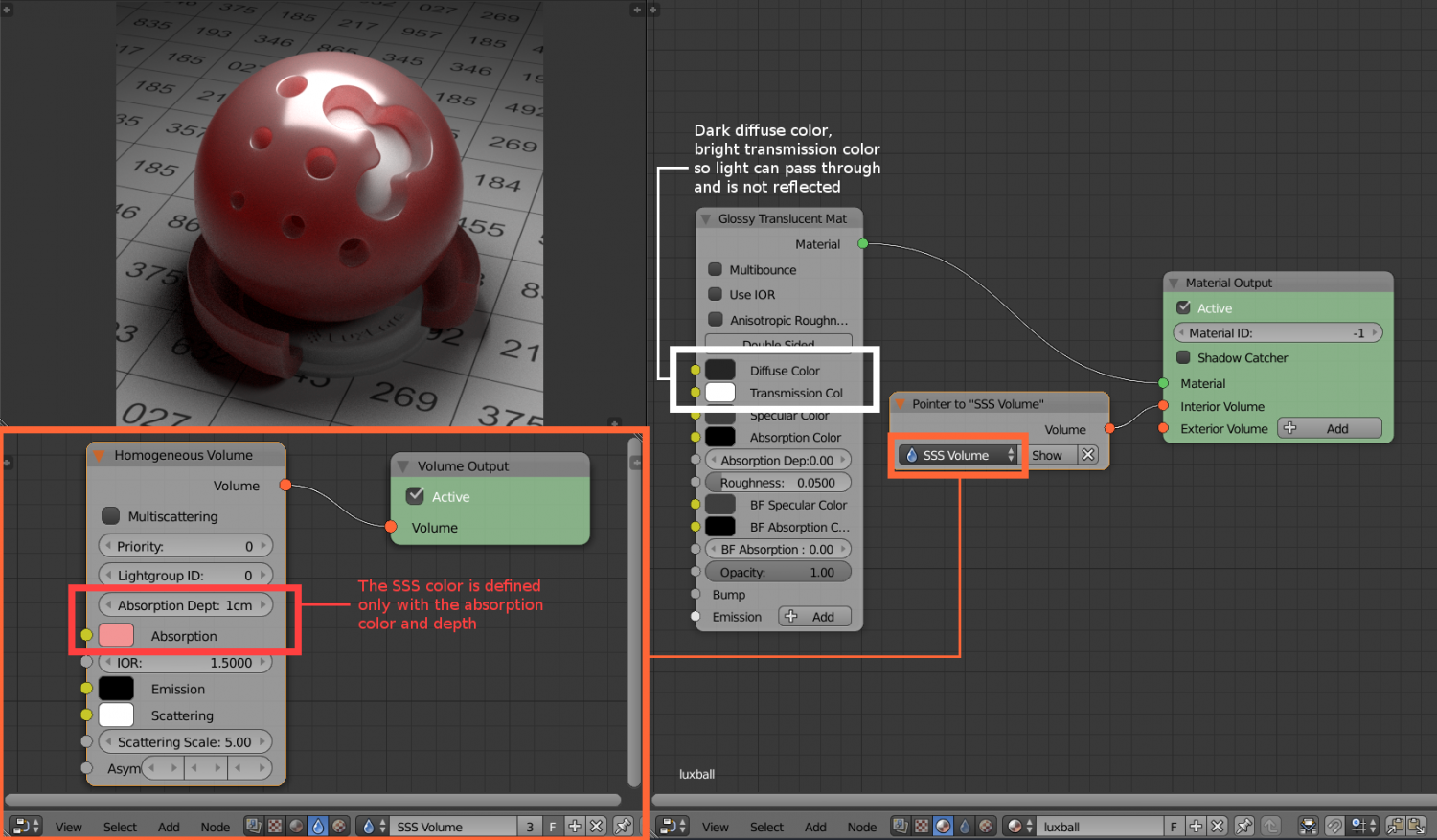
I basically copied wiki settings but result is very different
https://wiki.luxcorerender.org/Subsurface_Scattering
Re: Doing proper SSS
Posted: Mon Dec 23, 2019 4:10 pm
by Egert_Kanep
I used matte translucent for this test. Does this look correct?
Re: Doing proper SSS
Posted: Mon Dec 23, 2019 8:25 pm
by Egert_Kanep
some more experiments with sss. This time I tried to use color at depth node as scatter color parameter for volume. This way I can have variable volume ''density'' in the mesh

Re: Doing proper SSS
Posted: Mon Dec 30, 2019 2:50 pm
by wasd
Egert_Kanep wrote: Mon Dec 23, 2019 4:10 pm
I used matte translucent for this test. Does this look correct?
Nope, it doesn't.
I am just trying the same – make at least moderately correct looking human skin, but it seems current materials with volumes attached just don't make any sense. If they are physically based, I want to know on what physics.