Page 1 of 1
Normal map operations
Posted: Sun Jul 12, 2020 6:21 am
by chafouin
Hey there,
I am trying to lerp two normal maps. Not combine, but lerp / mix. Unfortunately the Color Math in BlendLuxCore doesn't support it, it says Wrong Input. Is there a way to do the normal map conversion later in the node tree and not in the Image node, so I can do normal maps operations?
Thanks!
Re: Normal map operations
Posted: Sun Jul 12, 2020 10:03 am
by B.Y.O.B.
First, you
can use the color math node for this, the warnings on the sockets are just UI warnings. And in this particular case, because the color math node is just a different UI for the same textures used internally in the (float) math node, it works.
The recommended way is to use the math node in mix mode.
This makes it clear to anyone opening the file that this is not a mistake and that the operation will work.
Is there a way to do the normal map conversion later in the node tree and not in the Image node, so I can do normal maps operations?
Yes, there is a normalmap node that takes color as input and outputs bump. However, it is not accessible through the "add nodes" menu because it confused too many users. You can add it by typing this into a Blender Python console:
Code: Select all
D.node_groups['your material'].nodes.new("LuxCoreNodeTexNormalmap")
Make sure to set your imagemaps to gamma = 1 if you use this.
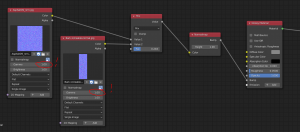
- the hidden normalmap node
Re: Normal map operations
Posted: Sun Jul 12, 2020 5:41 pm
by chafouin
Awesome B.Y.O.B., thank you.